I still remember the first time it hit me. I’d typed one search about a health symptom I was worried about, and for the next two weeks, my phone wouldn’t stop showing me ads for it.
I felt exposed in a way I couldn’t quite explain, like someone had been reading over my shoulder the whole time. That’s the moment I started actually looking into how much of my life online was being watched.
You open your laptop to check the weather, and by that evening, your phone is showing ads for umbrellas. That’s not a coincidence.
Every site you visit, every search you type, and every product you glance at gets logged somewhere. Your internet provider sees it. Advertisers buy it. Data brokers package it and sell it again.
Most people don’t notice this until something feels off. Maybe a private health question turns into weeks of targeted ads. Maybe a family member finds a search they didn’t want shared. The internet was never built with your privacy as the priority — it was built to collect data.
Why People Keep Getting This Wrong
A lot of well-meaning advice online is outdated or just plain wrong. This is where most of the confusion starts:
- People think Incognito mode makes them invisible. It doesn’t — your internet provider and the websites you visit can still see you.
- People install a free VPN app and assume they’re covered, without checking who owns that app or what it does with their data.
- People confuse “clearing history” with “erasing your digital footprint,” which are two completely different things.
- People believe anonymity is only for people with something to hide, when really it’s about basic control over your own information.
This bad information doesn’t just fail to help — it gives people a false sense of security while their data keeps leaking out the back door.
The Quiet Cost of Being Watched Online
Being tracked constantly wears on you in ways you might not expect. It’s not dramatic, but it adds up:
- You start second-guessing what you search, even for harmless things.
- You feel a small jolt of unease every time an ad “knows” something personal about you.
- You lose a sense of control over your own devices and accounts.
- Over time, this chips away at how safe you feel simply existing online.
Digital privacy isn’t paranoia. It’s a basic form of self-respect. You wouldn’t want a stranger reading your mail before you do, and your browsing history deserves the same boundary. The good news is that taking back that boundary doesn’t require becoming a tech expert — it just requires the right steps, done in the right order.
If you haven’t already tightened up the basics, it helps to start with building a solid digital safety foundation before layering on anonymous browsing tools. Privacy works best when it’s built in stages, not as one giant fix.
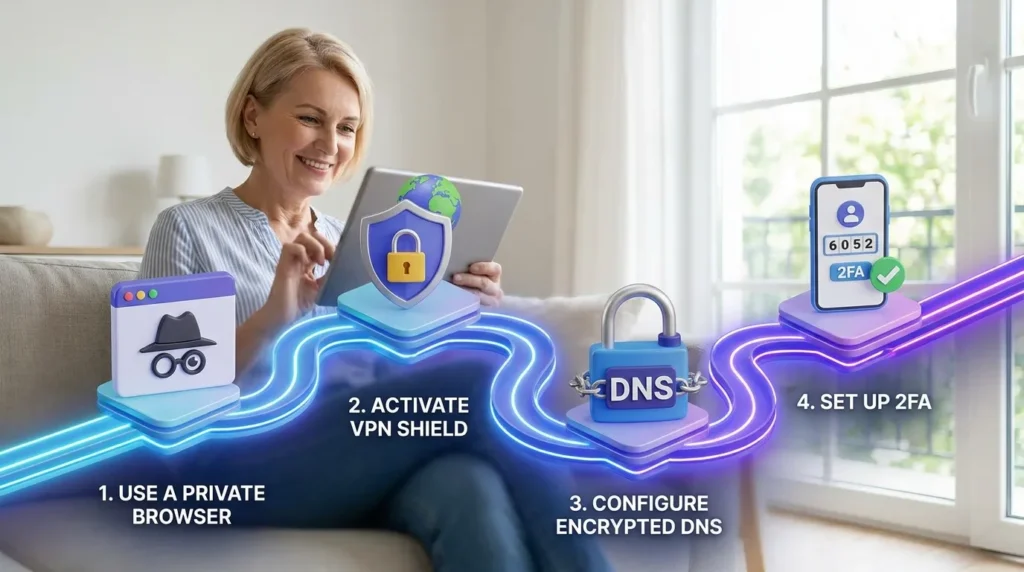
A Practical Path to Browsing Without Being Tracked
You don’t need to disappear from the internet completely to protect yourself. You need a few reliable habits, used consistently. Here’s where to start.
Step One: Choose a Browser and Search Engine Built for Privacy
Your regular browser and search engine are often the biggest leak in your privacy setup. Chrome and Google Search are built around collecting data to serve ads, and that’s simply how the business model works.
Switching to a privacy-focused browser closes a huge gap immediately. Firefox with strict tracking protection, or Brave, both block many trackers by default.
Pair that with a private search engine like DuckDuckGo or Startpage. These engines don’t log your searches or build a profile tied to your identity.
A browser is like a car with a big rear window that everyone can see through. Privacy tools are the tint that keeps your ride your own business.
If you’ve never reviewed your accounts for exposure, it’s worth also removing your personal information from the internet as a companion step, since a private browser can’t hide data that’s already public on data broker sites.
Step Two: Add a Trustworthy VPN to Hide Your Real Location
A VPN encrypts your connection and hides your real IP address behind the VPN server’s address. This stops your internet provider from seeing which sites you visit, and it stops websites from seeing your true location.
Not every VPN is equal, though. A free VPN with no clear privacy policy can log and sell your data — the exact thing you’re trying to avoid.
Look for a paid VPN with a published no-logs policy that’s been independently audited. According to the Electronic Frontier Foundation, encryption tools like VPNs are one of the most effective ways ordinary people can protect their online communications from surveillance.
A VPN protects the trip your data takes, but it doesn’t erase what you type into websites — that part still depends on your habits.
I made this mistake myself for months. I paid for a VPN and thought I was fully covered, but I never checked if my DNS requests were still leaking outside of it. Once I turned on encrypted DNS alongside my VPN, that’s when things actually started to feel private.
If you regularly connect from cafes, airports, or hotels, this step matters even more. Take a look at protecting yourself on public Wi-Fi, since open networks are one of the easiest places for someone to intercept your traffic.
It also helps to check your VPN provider’s jurisdiction. A company based in a country with strict data-retention laws may be forced to hand over logs, even if it claims not to keep them.
Look for providers that publish independent audit reports, not just marketing claims. A real audit checks the code and the servers, not just the privacy policy page.
One more thing worth mentioning: a VPN will not stop you from being tracked once you log into an account. If you sign into your email or a social platform, that service still knows it’s you, VPN or not.
It can be hard to picture how a VPN actually works just by reading about it. This short video does a great job of showing you exactly what happens to your data so you can feel more confident as you move through the rest of this guide.
Step Three: Use Tor Browser for Truly Sensitive Sessions
For everyday browsing, a private browser plus a VPN covers most people’s needs. But for situations that need real anonymity — research on a sensitive topic, communicating as a journalist, or simply wanting zero trace — Tor Browser adds another layer.
Tor routes your traffic through several volunteer-run relays, encrypting it at each hop. This makes it extremely hard for any single point in that chain to know both who you are and what you’re looking at.
It’s slower than normal browsing, and it’s not meant for daily use like checking email or streaming video. It works best as a tool for specific moments, not a full-time replacement for your regular setup.
The Federal Trade Commission also recommends reviewing your browser and device privacy settings regularly, since default settings rarely favor the user.
Keeping the Rest of Your Digital Life Locked Down
Anonymous browsing works best as one piece of a bigger privacy setup, not a standalone fix. If your home network itself is exposed, tools like a VPN or Tor only cover part of the risk.
That’s why it’s worth also securing your home Wi-Fi network, since a weak router password can undo a lot of the privacy work you just did on your browser.
Small, consistent habits protect you far better than one big overhaul that you abandon after a week. Pick one step from this list, apply it today, and build from there in Part 2.
None of these steps require special technical skill. A private browser is a download. A trustworthy VPN is a subscription and a few taps. Tor Browser installs like any other app.
What actually makes the difference is doing them in order, and sticking with them, instead of jumping between random tips you saw once and forgot about.
Closing the Gaps a Basic Setup Still Leaves Open
A private browser, a good VPN, and Tor cover most of the obvious tracking. But a few sneaky methods still slip past that basic setup.
These next tips are what separates a casual privacy effort from one that actually holds up.
Blocking Browser Fingerprinting, Not Just Cookies
Cookies get most of the attention, but browser fingerprinting is a quieter and more advanced tracking method. It looks at your screen size, fonts, installed plugins, and even your battery level to build a unique profile of your device.
You can clear every cookie you have, and fingerprinting can still identify you the next time you show up. According to Wikipedia’s entry on browser fingerprinting, this technique can identify a device even when cookies and private browsing are both in use.
Browsers like Firefox include settings that randomize or block this kind of fingerprinting. Turning on “Resist Fingerprinting” in Firefox’s privacy settings closes a gap that most people never even know exists.
Locking Down DNS Requests
Every time you type a website address, your device sends a DNS request to translate that name into an actual server address. By default, this request often travels unencrypted, which means your internet provider can see exactly which sites you’re visiting, even with a VPN misconfigured or turned off.
Switching to encrypted DNS, sometimes called DNS-over-HTTPS, closes this leak. Most modern browsers let you turn this on in a few clicks, inside the network or privacy settings menu.
Your VPN is only as private as its weakest link. An unencrypted DNS request can undo a lot of the protection you just paid for.
Separating Your Identities Online
One advanced habit that professionals use is keeping separate browser profiles or containers for different parts of life. Work searches stay in one profile, personal browsing stays in another, and anything sensitive stays in a private window with Tor or a VPN active.
This stops one account or search history from bleeding into another and building a combined profile of you. Firefox’s “Multi-Account Containers” extension is a simple, free way to start this habit today.
It also helps to review who else has access to your accounts. If you haven’t set this up yet, take a look at setting up two-factor authentication, since anonymous browsing means little if someone else can simply log into your accounts directly.
Making This Stick Long-Term
The people who keep their privacy habits going long-term don’t treat this as a one-time project. They build it into normal routine, the same way you’d lock your front door without thinking about it.
Set a recurring reminder every few months to check your VPN’s audit status, update your browser, and review which extensions you’ve installed. Old extensions are a common, overlooked source of tracking.
It also helps to regularly check your devices for anything that shouldn’t be there. Learning how to detect hidden spyware on your personal computer is a good habit to pair with your browsing setup, since spyware can record your activity no matter how private your browser is.
Reviewing Your Passwords Alongside Your Browsing Habits
None of these privacy tools matter much if someone can simply guess or steal your account password. Weak, reused passwords are still one of the most common ways people lose control of their accounts.
A password manager generates a unique, complex password for every account and stores them securely, so you never have to remember them yourself. If you’re still reusing the same password across multiple sites, it’s worth reading about why a password manager matters for every account before you go any further with your privacy setup.
Pairing strong, unique passwords with the browsing habits above gives you a much more complete picture of protection, instead of just one piece of the puzzle.
Where Good Intentions Usually Go Wrong
Even careful people slip up here. These are the mistakes that undo most of the progress from the steps above.
- Relying on a free VPN with no clear privacy policy. Many free VPNs make money by logging and selling the exact browsing data you’re trying to hide.
- Staying logged into personal accounts during a “private” session. If you’re signed into your email or social media, that platform still knows it’s you.
- Ignoring browser extensions. A single poorly reviewed extension can read everything you type and everywhere you go.
- Forgetting about your social accounts. Anonymous browsing habits mean little if your social media privacy settings are wide open to the public.
- Treating this as a one-time fix. Privacy tools update, break, and change their policies, so a setup you did once needs occasional review.
Skipping these details doesn’t just weaken your privacy. It can expose your location, your identity, and sometimes your financial information to people who have no business seeing it.
Quick Answers to Common Questions
Is Google Incognito really private?
No. Incognito only stops your browsing history from being saved on your own device. Your internet provider, employer, and the websites you visit can still see your activity.
Is Tor Browser 100% anonymous?
No tool offers absolute anonymity. Tor makes tracking extremely difficult, but logging into personal accounts or downloading files while using it can still expose your identity.
Which search engine is most anonymous?
DuckDuckGo and Startpage are widely considered the most private mainstream options, since neither one logs your searches or builds an advertising profile tied to you.
How do I browse anonymously on a phone?
Install a private browser app, connect through a trusted VPN, and switch your default search engine to a private one. The same core principles from desktop apply directly to mobile.
Can private browsing still be traced?
Yes. Private or Incognito windows hide your history locally, but your IP address, DNS requests, and account logins can still reveal who you are to outside parties.
Your Privacy Is Worth Protecting, Starting Today
You don’t need to overhaul your entire digital life in one afternoon. Pick one habit from this guide, whether that’s switching your search engine or turning on encrypted DNS, and start there.
Real privacy is built one small decision at a time, not through a single perfect setup. Every step you take back is one less piece of your life sitting in someone else’s database.
Come back to this guide whenever you add a new habit, and share it with anyone in your life who still thinks Incognito mode is enough. A little awareness goes a long way toward a safer, more private online life.
Looking back, I wish I hadn’t waited so long to take this seriously. Every small change I made added up to a much bigger sense of control over my own life online. If I could do it after years of ignoring the problem, you can absolutely start today.
Disclaimer: This article is provided for general informational and educational purposes only and does not constitute professional cybersecurity, legal, or financial advice. Tools such as VPNs, Tor Browser, and private search engines can significantly reduce online tracking, but no method guarantees complete or absolute anonymity. Readers should evaluate their own individual risk level and consult a qualified security professional for situations involving serious personal safety, legal, or financial concerns. Securely Life is not responsible for any outcomes resulting from the use of the tools or practices described in this post.