
Which Lock Would Actually Stop Someone Tonight?
Most people pick a lock based on price, looks, or whatever the hardware store had in stock — not on whether it would actually stop someone trying to get through the door tonight.
The marketing language printed on most lock boxes rarely matches what the lock inside can actually withstand. There’s a real gap between “looks secure” and what a lock is tested to survive, and that gap is where most bad decisions happen.
That gap shows up in real homes in a few predictable ways:
- A lock that looks heavy-duty but folds under a single hard kick, because the screws holding it are too short to matter.
- A keyless lock with a beautiful app and a default four-digit code nobody bothered to change.
- A deadbolt that’s technically locked but only catches a half-inch of wood, so the door frame gives way before the bolt does.
None of these are rare mistakes. They’re the default setup in a huge number of homes, simply because nobody explained what actually makes a lock strong versus what just looks strong.
The good news is that this isn’t a mystery. Lock strength is tested, measured, and graded by industry standards, not guessed at. According to the American National Standards Institute’s own breakdown of lock testing, every graded lock goes through lab testing across operational, cycle, strength, and security categories before it earns a number — which means the grade on the box isn’t a marketing claim, it’s a lab result.
Once you understand what that number means, choosing between a keyless door lock and a deadbolt stops being a guessing game.
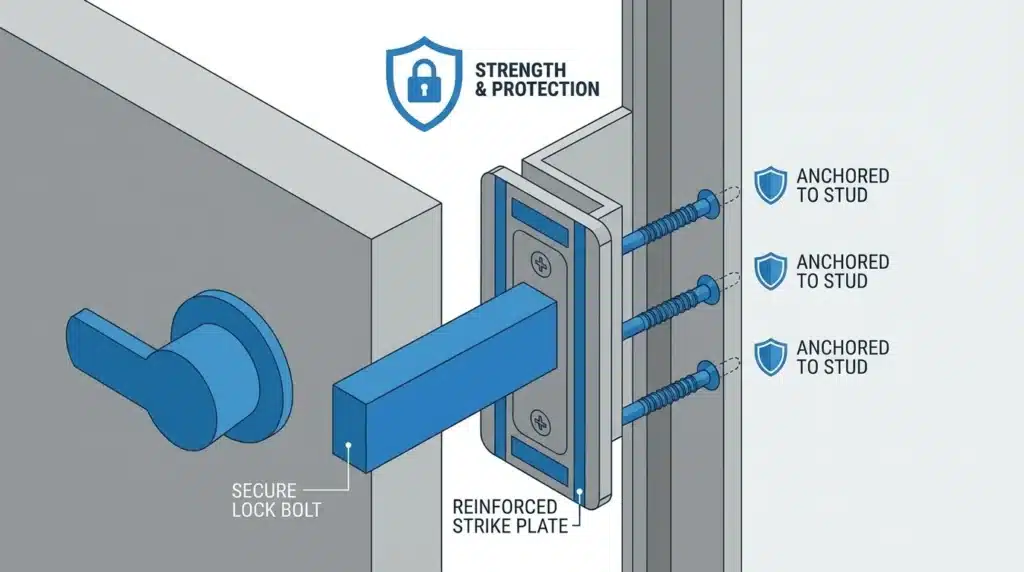
How Lock Failures Actually Happen
Break-ins rarely look like the dramatic lock-picking scene from a movie. Most involve kicking, prying, or shoulder-ramming a door until something gives.
ANSI/BHMA Lock Grade Comparison
| Feature / Test | Grade 1 (Commercial / Heavy Security) | Grade 2 (Advanced Residential) | Grade 3 (Basic Residential) |
|---|---|---|---|
| Impact / Kick-In Resistance | 10 door strikes (highest force) | 5 door strikes (moderate force) | 2 door strikes (light force) |
| Operational Lifespan | 1,000,000 cycles | 800,000 cycles | 200,000 cycles |
| Best Suited For | High-security front doors | Standard front & back doors | Interior doors or budget builds |
Forced entry, not finesse, is the real threat. Most residential break-ins involve kicking, prying, or shoulder-ramming a door until something gives — usually the door frame, not the lock cylinder itself. This is exactly why ANSI/BHMA testing includes strike and impact tests, not just how many times a lock can open and close.
A Grade 1 lock is tested to handle real force, not just marketing claims. Grade 1 hardware has to survive repeated hammer strikes and hundreds of thousands of open-close cycles in lab conditions before it earns that label. Grade 3, the entry-level residential standard, is tested to a noticeably lower threshold — which is exactly why it’s the grade most commonly installed by builders trying to cut costs.
Bumping and picking are a different threat entirely, and they favor keyless locks. A traditional pin-tumbler deadbolt can sometimes be opened with a “bump key” in seconds, without any visible damage to the door. A keyless lock with no physical keyhole removes that specific attack method completely, which is one of the more underrated advantages of going keyless.
But keyless locks trade one risk for another: digital access. If your lock connects to Wi-Fi, it inherits the same weaknesses as any other smart home device. Default passwords, unpatched software, and reused credentials are the most common ways connected devices get compromised — a pattern confirmed in NIST’s own research on smart home device security, which specifically calls out password reuse as one of the most preventable mistakes homeowners make.
A surprising number of keyless lock owners leave the default access code active for days after installation, mostly because nothing in the setup process forces them to change it. That single step — done the same day the lock goes in — closes one of the easiest entry points a keyless system has.
Watch This Before You Decide
If you want to see exactly how a Grade 1 lock holds up against real forced-entry testing side by side with a Grade 3 lock, this comparison makes the difference obvious in under two minutes.
Keyless Door Lock vs Deadbolt: What Actually Separates Them
Here’s where the two options genuinely differ — not in marketing copy, but in mechanics.
| What Matters | Traditional Deadbolt | Keyless Door Lock |
|---|---|---|
| Power dependency | None — works during outages | Needs batteries; most last 6–12 months |
| Primary weak point | Physical picking or bumping | Weak passwords or unpatched software |
| Forgotten-lock risk | High — stays unlocked until you turn it | Low — auto-lock features close this gap |
| Spare key risk | Hidden keys can be found or copied | Digital codes can be deleted instantly |
| Typical lifespan | 20–30 years with basic care | 5–7 years before replacement is common |
| Entry method after a lockout | Physical key always works | Depends on backup access method |
Neither column is strictly “safer” on its own. A deadbolt wins on reliability and physical simplicity — nothing to hack, nothing to charge, nothing to update. A keyless lock wins on human-error protection — it solves the forgotten-lock and hidden-spare-key problems that cause a surprising number of real break-ins.
If your front door frame is old or has already been kicked once, that weakness matters more than which lock you put on it. Reinforcing the door frame itself before upgrading the lock is one of those unglamorous fixes that outperforms almost any lock upgrade on its own — a Grade 1 lock in a weak frame is still a weak door.
For renters who can’t drill into the frame at all, the calculus changes again. If that’s your situation, apartment-friendly security options that don’t require permanent modifications are worth checking before you assume a full lock swap is even possible.
One detail that trips people up with keyless locks specifically: battery failure. A dead battery at the worst possible moment is common enough that it deserves its own plan — knowing exactly what to do when a smart lock’s battery dies before it happens saves you from standing on your porch at midnight with no way in.
The Upgrades a Locksmith Would Actually Recommend
Most lock-buying advice stops at “get a Grade 1 lock.” That’s a good start, but it misses the parts of your door that decide whether the lock even matters.
Start with the hinges, not just the strike side. If your door swings outward, the hinge pins are exposed on the outside, and a determined intruder can sometimes pop them out and lift the whole door off its frame — lock included. Non-removable hinge pins, or hinges with a small set screw, close this gap for a few dollars and about ten minutes of work.
Re-keying matters more than most people think. If you’ve moved into a home that isn’t brand new, you have no real way of knowing how many copies of the key are floating around. A professional door reinforcement setup paired with a fresh re-key (or a full keyless swap, which sidesteps the copied-key problem entirely) closes a gap that a shiny new lock alone won’t.
According to the Redmond Police Department’s official home security guide, reinforcing the hinges, frame, and doorstop strip with screws long enough to reach the wall stud is one of the specific fixes officers recommend, because without it, a pry bar can force the frame and door apart even with a good lock installed.
Pro-Tip: don’t skip the glass near your door. A Grade 1 deadbolt means very little if there’s a sidelight window within arm’s reach of the lock — someone can simply reach through the glass instead of dealing with the lock at all. A security film on any glass near the door closes that gap for a fraction of what a full lock upgrade costs.
If you’re going the keyless route, there’s a software side to “maintenance” that a traditional deadbolt never needed:
- Rotate access codes every few months, not just when a guest leaves.
- Turn on two-factor authentication for the lock’s companion app, the same way you would for a banking app.
- Check for firmware updates monthly — most breaches on connected devices exploit outdated software, not clever hacking.
And if you’re weighing whether to go keyless at all, a room-by-room beginner’s approach to home security is worth reading first, since the lock is only one part of a much bigger picture that includes windows, lighting, and visibility from the street.
None of these steps make a door immune to a break-in — nothing does. What they do is stack enough small resistances together that a burglar looking for an easy target moves on to a house that skipped all of this.
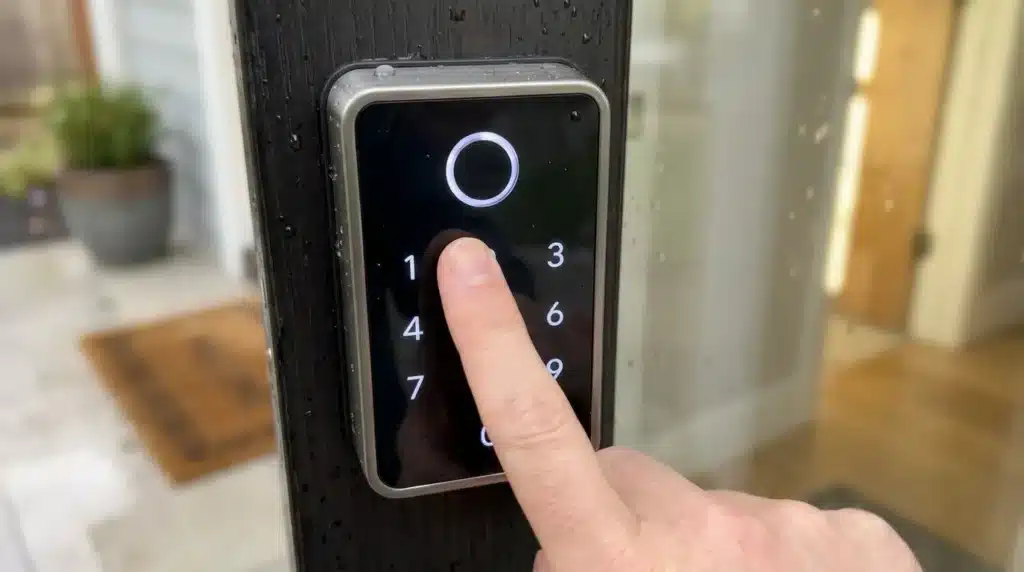
Where People Quietly Undo Their Own Security
Most lock failures aren’t really about the lock. They’re about a habit that cancels out a good lock entirely.
Do this:
- Change the default code the same day you install a keyless lock, before the first guest ever uses it.
- Test your auto-lock feature in different weather — wind and cold can keep a door from latching all the way.
- Keep a physical backup key somewhere that isn’t the porch, the mailbox, or under anything near the door.
Don’t do this:
- Leave the factory master code active “just for now.” Most people who do this mean to change it later and simply forget.
- Assume a smart lock’s beep means the bolt is fully seated. On a slightly crooked door, that beep can happen before the bolt is all the way in.
- Install a keyless lock upside down or misaligned to “make it fit.” This creates friction that drains the battery fast and makes the mechanism easier to force.
There’s also a mismatch that catches busy families off guard: they buy a great lock, then treat it like a “set it and forget it” purchase. A deadbolt left unlubricated for years starts to stick, and people compensate by slamming the door harder, which loosens the strike plate over time.
A keyless lock left on old batteries is worse — it can fail silently, either locking you out at the worst possible moment or, more concerning, failing to lock at all without any obvious warning.
None of this means either option is unsafe. It means a lock significantly reduces risk when it’s maintained, and that risk reduction fades quietly if nobody’s checking on it.
Common Questions About Keyless Locks and Deadbolts
Are keyless locks easier to break into than deadbolts?
Not inherently — a Grade 1 keyless lock resists physical force just as well as a Grade 1 deadbolt, since they’re tested against the same ANSI/BHMA standards. The difference is the type of attack each one is vulnerable to, physical versus digital.
Can someone hack a keyless lock from outside my house?
It’s possible in theory, but in practice, most reported break-ins involving keyless locks trace back to weak or reused passwords, not sophisticated remote hacking. A strong, unique password and enabled two-factor authentication close most of that risk.
Do I need a locksmith to install a keyless lock?
Most keyless locks are designed for a homeowner to install in under an hour with a screwdriver, since they usually fit standard door prep. A locksmith becomes worth calling if your door frame is old, warped, or already damaged.
What happens to a keyless lock if the power goes out?
Keyless locks run on their own batteries, not your home’s electricity, so a power outage alone won’t lock you out. What will cause a problem is a dead battery, which is why most models include a backup option like a physical key cylinder or a 9-volt terminal for an emergency charge.
Is it worth keeping a deadbolt if I already have a smart lock?
Many keyless locks are actually built into a deadbolt mechanism, so you’re not necessarily choosing one over the other. If yours isn’t, pairing a separate manual deadbolt underneath adds a layer that has nothing to fail electronically, which some families prefer for overnight security specifically.
How often should I replace a keyless door lock?
Most last five to seven years before the electronics start showing their age, even if the mechanical parts are still fine. Watch for slow responsiveness or a keypad that needs harder presses than it used to — both are early signs it’s time to plan a replacement.
Making the Actual Decision for Your Front Door
The short version: stop comparing “smart” versus “traditional” first, and start checking the grade sticker first. That one detail matters more than every other feature on the box combined.
After that, the decision comes down to daily habits, not fear of burglars. A household that loses track of keys constantly usually does better with a keyless lock. Someone who wants zero maintenance and doesn’t mind carrying a key usually does better with a straightforward deadbolt.
A Grade 1 deadbolt on the bottom paired with a keyless lock on top is a common compromise for homes that want both — mechanical reliability at night, digital convenience during the day.
Check your own door tonight if you haven’t already. Look at the grade sticker if you can find it, check whether your hinge pins are exposed, and see how long your strike plate screws actually are. That five-minute check tells you more than any spec sheet will.
None of this comes from a locksmith’s license or a security certification — it’s put together from publicly available testing standards and a fair amount of personal reading on the topic. If your door frame looks old, damaged, or you’re just not sure what condition it’s in, a local locksmith can check it properly before you commit to either option.



5 thoughts on “Keyless Door Lock vs Deadbolt: What the Testing Data Actually Shows”
Comments are closed.