Imagine it is late at night. Your teenager is supposed to be home from a study session, but they are twenty minutes late.
You call their phone, but it goes straight to voicemail. You send a text, but there is no reply.
That cold feeling starts to grow in your chest. Your mind races through every bad thing that could happen. This is a feeling millions of parents and partners face every single day.
We live in a world where we want to give our loved ones freedom. However, that freedom often comes with a heavy price of constant worry and fear. You want to know they are safe without being overbearing or annoying. According to trusted Forbes technology reports, digital safety solutions have seen a massive surge as global families look for smarter ways to stay connected.
The distance between you and your family can feel like a huge gap when you cannot reach them. This simple lack of information causes more stress than almost anything else in modern life. Utilizing a reliable situational awareness and personal safety guide along with real-time location sharing tools can bridge this emotional gap instantly.
Why Finding the Right Safety Solution Is So Hard
Many people try to fix this problem using basic tools, but they often fail when they are needed most. Understanding how Global Positioning System (GPS) technology functions within civilian software helps clarify why the usual methods do not work for everyone:
- Unreliable Phone Calls: Phones often stay in bags or on silent mode, making a simple call useless in an emergency.
- Battery Drain Issues: Many basic tracking apps eat up phone battery so fast that the phone dies when the person needs it most.
- Privacy Concerns: Some apps sell your private data, making people afraid to use location-sharing tools at all.
- Complicated Interfaces: If an app is too hard to use, your elderly parents or young children will never use it correctly.
- False Alarms: Poorly designed apps send too many “emergency” alerts that are actually mistakes, leading to “alert fatigue.”
- Delayed Updates: Some tools only update the location every ten minutes, which is not fast enough during a real crisis.
How Constant Uncertainty Damages Your Daily Life
Not knowing the safety status of your family does more than just make you nervous for a few minutes. It has a real impact on your long-term health and happiness:
- Chronic Stress: Constant worrying about “what if” situations increases your cortisol levels and makes you feel exhausted.
- Loss of Focus: It is hard to do your best work when you are constantly checking your phone for a “home safe” text.
- Strained Relationships: Repeatedly calling your kids or partner to check on them can feel like “nagging,” which creates tension.
- Physical Exhaustion: The mental load of tracking everyone’s schedule manually leads to burnout and poor sleep.
- Fear of Independence: Because you are scared, you might stop your children from exploring or going to new places.
Transforming Fear Into Real Digital Security
The reality is that we cannot always be physically present with the people we love. Life is busy, and we all have different schedules.
But technology has finally reached a point where it can act as a digital bodyguard. Personal safety apps are not just about “spying” on someone.
Instead, they are about creating a safety net that stays invisible until it is actually needed. Think of these apps as a silent promise between family members. It says, “I trust you to go out, and I am here if you need me.” When you have a reliable tool in your pocket, that heavy weight of worry starts to lift.
You no longer have to wonder if they reached the office or if the school bus arrived on time. The app tells you the truth in real-time. This transparency builds trust rather than breaking it. It allows everyone in the family to move through the world with more confidence. We are going to look at how you can use these tools to build a safer environment for everyone you care about.
How to Choose and Set Up the Perfect Safety Tool
Choosing the right app is the first step toward reclaiming your peace of mind. You need something that fits your family’s unique lifestyle. Not every app is built for every person. Some are great for kids, while others are better for solo travelers or seniors.
Step 1: Identifying Your Primary Safety Goals
Before you download anything, you must ask yourself what you really need. Are you mostly worried about car accidents? Or are you worried about your child walking home from the park? Perhaps you have an elderly parent who might get lost while walking.
Identify the biggest risk first so you can pick an app with the right features. For example, some apps focus on “Crash Detection,” while others focus on “Geofencing.” If you have a teen driver, you want an app that monitors speed and sudden braking. If you have a small child, you want an app that alerts you the moment they leave the school grounds.
Step 2: Setting Up Smart Geofences for Automatic Updates
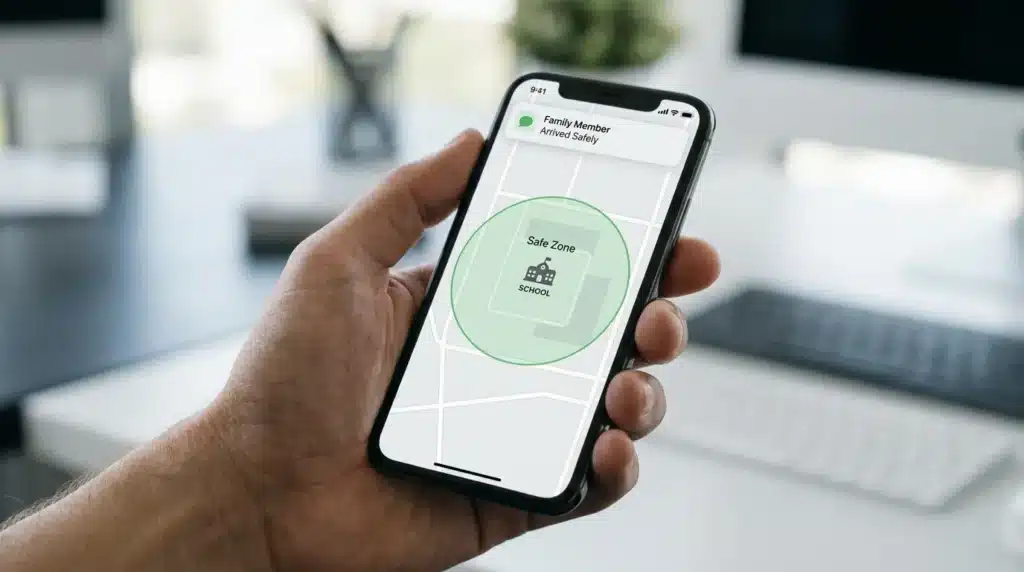
A “Geofence” is a virtual boundary on a map. This is one of the most powerful features of modern safety apps. Instead of checking the map every five minutes, you can set up Safe Zones. You can draw a circle around your home, the school, and the workplace.
The app will then send you a notification when your loved one enters or leaves those areas. This means you get a “Johnny arrived at school” alert without Johnny having to do anything. It takes the pressure off the child to remember to text you. It also gives you instant information without you having to be a “helicopter parent.”
Step 3: Teaching Your Family the “SOS” Protocol
An app is only helpful if everyone knows how to use it during a panic. You must have a family meeting to discuss the Emergency Button. Show every family member how to trigger a silent alarm or a loud siren on their phone. Explain that this button is only for when they feel truly unsafe.
Most apps allow the phone to start recording audio or video as soon as the SOS is pressed. This can be vital for understanding what is happening on the ground. Practice a “dry run” once a month so the action becomes muscle memory. If a child is scared, they might not be able to think clearly. They need to be able to send that alert without even looking at the screen.
Step 4: Balancing Privacy and Security
One of the biggest hurdles to using safety apps is the feeling of being “watched.” This is why open communication is so important. Talk to your family about why you want to use these tools. Emphasize that it is about safety and help, not about control.
Many apps allow users to turn off location sharing for a short time if they want privacy. Respecting these boundaries helps everyone feel more comfortable with the technology. Explain that you only look at the map when there is a reason to worry. When everyone feels like they have a say in the process, they are much more likely to keep the app active. For younger children, transitioning online requires a tailored child online safety guide alongside location tools to maintain absolute protection.
Step 5: Managing Phone Health for Constant Connection
A safety app is useless if the phone is dead. You need to teach your loved ones to keep their battery charged. However, good apps also help with this by showing you the battery percentage of everyone in your circle. If you see your daughter’s phone is at 5%, you can send a quick text to remind her to charge it.
You should also check the “Low Power Mode” settings on the phones. Sometimes, these modes stop the GPS from working to save power. Make sure the safety app has permission to run in the background at all times. This ensures the location is always accurate, even if the app is closed. Consistency is the key to digital security. A tool that only works half the time is not a tool you can trust.
Why Real-Time Data Beats a Phone Call
In a fast-moving situation, a phone call takes too long. If someone is in trouble, they might not be able to speak. They might be in a crowded place where they cannot explain their location. This is where GPS precision becomes a hero. The app shows you exactly where they are, often within a few meters.
If they are in a moving car, you can see the direction and speed. This data provides a level of detail that a voice call never could. It allows you to give emergency services an exact address or landmark. In many cases, having this data ready can save minutes, and in an emergency, every second counts. It is about having the facts right when you need them.
The Psychology of Feeling Secure
There is a huge psychological benefit to knowing your family is just a tap away. It reduces the “mental load” that parents carry every day. When you know the app will tell you if something is wrong, you can relax and enjoy your own day. You can focus on your tasks and your own life.
This creates a healthier family dynamic. You aren’t checking in out of fear; you are staying connected out of love. The peace of mind you gain is worth more than any piece of hardware. It allows your family to grow and explore while keeping the invisible safety net strong. We are moving into a future where we don’t have to guess if our loved ones are okay. We can simply know.
Mastering Your Safety Network with Advanced Expert Tips
Now that you have the basics ready, it is time to look at the advanced ways to use these tools. Most people just install an app and forget about it. But to get the best results, you need to understand the hidden features that make a big difference. These small changes can transform a simple tracking tool into a powerful security system.
Customizing Driving Safety Insights for New Drivers
If you have a teenager or a young driver in the family, this feature is a game-changer. Most high-end safety apps now include driving behavior monitoring. It is not just about where they are going, but how they are getting there. You can set the app to notify you if the car goes above a certain speed. It can also detect “hard braking” or “rapid acceleration.” Instead of being a “spy,” use this data as a teaching tool.
Real-time crash detection is another life-saving feature you should activate. This uses the phone’s sensors to feel if a high-impact collision happens. The app can then automatically call emergency services and send your exact location to your family circle. You don’t have to do anything; the technology does it for you when you are unable to move.
Scheduling Routine Check-ins for Solo Travelers
For family members who travel for work or go on solo hikes, manual check-ins are very helpful. You can set up a Safety Timer within many modern apps. Imagine your daughter is walking through a quiet park at night. She can start a timer for fifteen minutes.
If she does not “check in” or deactivate the timer by the time it runs out, the app sends an emergency alert to you. It also shares her last known path on the map. This is especially vital for non-traditional working hours, making it an excellent addition to standard night shift worker safety commuting tips.
Establishing a Long-Term Family Safety Routine
Using a safety app is not a “one-and-done” task. To keep everyone protected over the long haul, you need a consistent routine.
I recommend having a “Family Tech Night” once a month. During this time, everyone opens the app on their phone together. Update the app to the latest version to ensure all security patches are active.
Using “Low Battery” Alerts as a Communication Bridge
One of the coolest pro-level secrets is using the low battery notification. When you see your partner’s phone is at 10%, don’t just worry that they will go offline. Use it as a reason to send a quick, loving message.
“Hey, I see your phone is low, just wanted to say I love you and talk soon!” This makes the technology feel more like a connection tool and less like a tracking device.

Crucial Mistakes to Avoid for Maximum Protection
Even the best technology can fail if it is not handled correctly. Many users make simple mistakes that can lead to a false sense of security. Knowing what not to do is just as important as knowing how the app works.
Ignoring Background Data and Battery Settings
The number one reason safety apps stop working is the phone’s “Battery Saver” mode. Both Android and iPhone try to save power by closing apps that run in the background. If your safety app is “killed” by the phone, it cannot send your location or detect an emergency. You must go into your phone settings and set the app to “Allow Background Activity” or “No Restrictions.”
Relying on Too Many Apps at the Same Time
Some people think that having three different safety apps is better than one. This is actually a big mistake. Using multiple GPS apps at once creates software conflicts and drains the battery twice as fast. Choose one high-quality app that everyone in the family likes and stick to it.
Setting Geofences That are Too Small
When you draw a “Safe Zone” around a building, you might be tempted to make it very small. However, GPS signals can “drift” by a few meters, especially when someone is inside a building. Always make your zones at least 150 to 200 meters wide. This gives the GPS enough room to be slightly off without triggering a panic.
Forgetting to Review Permission Settings After Updates
Sometimes, when a phone does a major software update, it resets the permissions for your apps. Your safety app might lose its access to your location or microphone. Ensure the “Always Allow” location permission is still selected. Without this, the app can only see where you are when you have it open on your screen.
Failing to Discuss Privacy Boundaries Honestly
The biggest mistake is using these apps without a clear talk about privacy and trust. If a teenager feels like you are “stalking” them, they will find ways to trick the app. Instead, be honest about why you are using it. Show them how the app can help them if they are ever in trouble or need a ride.
Answers to Your Most Common Safety App Questions
Can these apps find a phone if it is turned off?
Most apps require the phone to be powered on to send a real-time GPS signal. However, many of them show you the last known location right before the battery died.
Do safety apps work in areas with poor cell service?
GPS often works even when the internet is weak, but the app needs a data connection to send that location to your phone.
Are these apps legal to use for my family?
Yes, using safety apps for minor children or with the consent of adults in your family is perfectly legal. Using these tools for tracking people without their knowledge is generally not recommended.
Will the app use up all my monthly mobile data?
Safety apps are designed to be very efficient. They send tiny bits of data (text-based coordinates) rather than large files.
Can I use these apps if my family uses different phone brands?
Most top-rated safety apps are “cross-platform.” This means they work perfectly even if one person has an Android and the other has an iPhone.
Taking Action for a More Secure Future
You have learned how to turn your smartphone into a powerful shield for your family. By following these steps, you are moving from a state of worry to a state of preparedness. Safety is not about living in fear; it is about having the right tools to face the world with confidence. Start today by having that conversation with your family.
Disclaimer: This article is for informational purposes only. Personal safety apps are tools to assist in communication and location sharing but should not be the only method of safety. Always contact local emergency services immediately in dangerous situations. The effectiveness of these apps depends on hardware, signal strength, and user settings.