About the Author: This comprehensive security blueprint was compiled by the Securely Life Editorial Team, featuring insights from certified cybersecurity professionals with over a decade of experience in financial threat mitigation and digital asset protection.
Imagine waking up on a quiet Sunday morning and picking up your phone to check your balance. Instead of your savings, you see a giant zero staring back at you.
Your heart drops, your stomach turns, and a cold sweat breaks out across your forehead. All those months of hard work and late nights have vanished in a few clicks. As cybercriminals develop increasingly sophisticated methods, safeguarding your digital finances has become more critical than ever; Google’s official safety guidelines emphasize the importance of securing your primary accounts to prevent unauthorized access.
This is the nightmare that thousands of people face every single day. Digital thieves do not need to break into your house or hold you up in an alley anymore. They sit in dark rooms halfway across the globe, waiting for you to make one tiny mistake.
The fear of being hacked is not just about the money; it is about the feeling of being totally exposed. When your financial life is tied to your phone, you are always one wrong click away from a disaster. In fact, financial fraud and identity theft have grown into a massive global issue, with regulatory bodies like the Federal Communications Commission (FCC) actively implementing strict policies to protect consumers from mobile and cell phone fraud.
The digital world feels too big and too scary to control, leading to a deep sense of helplessness and defeat. You lie awake at night wondering if your “secure” password was part of a major data breach—a form of systemic security failure that, as documented on Wikipedia, exposes millions of corporate and personal credentials to the dark web every year.
Eventually, this constant stress over money and security leads to arguments and a lack of focus on the people you love. Building real protection is essential to reclaim your mental clarity and protect your loved ones. If you want to expand your baseline security habits, explore our guide on 5 essential tips for a securely life.
Why Most People Stay Vulnerable to Banking Theft
- The Password Illusion: Most users believe that a simple password and their bank’s basic security are enough to protect them.
- The Reuse Trap: People often use the same password for their email, social media, and their multi-thousand dollar bank account.
- Ignored Updates: We often ignore software updates on our phones, leaving open doors for hackers to slide through.
- Phishing Text Scams: Many people are tricked by fake text messages that look exactly like they came from a real bank.
- Tech Jargon Overwhelm: The search for safety often leads to confusing tech jargon that makes people give up and hope for the best.
- Public Wi-Fi Risks: Public Wi-Fi is used to check balances because it is convenient, ignoring the “digital sniffer” watching every move.
How Digital Insecurity Ruins Your Mental Peace
- Financial Paranoia: You find yourself checking your bank app every hour just to make sure the money is still there.
- Loss of Trust: You start to fear every email and text message, wondering if a scammer is on the other side.
- Feelings of Helplessness: The digital world feels too big and too scary to control, leading to a sense of defeat.
- Sleepless Nights: You lie awake wondering if your “secure” password was part of a data leak you heard about on the news.
- Impact on Relationships: Stress over money and security leads to arguments and a lack of focus on the people you love.
The reality of modern banking is that you are the primary gatekeeper of your wealth. Banks have security, yes, but they cannot stop you from handing over your “key” to a stranger by accident. Digital thieves do not always “hack” the bank; they hack the human.
They use your own habits and your own trust against you. They know that you are busy, tired, and likely looking for the easiest way to get things done. Your convenience is their greatest weapon.
This guide is about taking that weapon away from them. You do not need to be a computer genius to build a digital fortress around your money. You just need to change a few small habits and understand how the “bad guys” think.
By the time you finish this, you will move from a place of fear to a place of absolute control. You will be able to log in, move your money, and live your life without looking over your shoulder. Let’s start building your shield.
10 Essential Steps to Secure Your Online Banking
Step 1: Moving Beyond SMS Authentication
Most people think they are safe because they have Two-Factor Authentication (2FA) turned on. They wait for that six-digit code to arrive via text message and feel secure when it does. However, relying on SMS is one of the biggest mistakes you can make in the modern world.
Digital thieves use a trick called “SIM Swapping.” They call your mobile carrier, pretend to be you using stolen identity details, and convince the agent to move your phone number to a new SIM card. Once they have your number, they can intercept your banking verification codes.
This vulnerability highlights why cybercriminals heavily rely on network interception. To understand the full technical mechanics behind this threat, you can read more about how a SIM swap attack operates and how it exploits telecom vulnerabilities.
The Solution: Use Authenticator Apps
Instead of SMS, you should use a dedicated authenticator app like Google Authenticator or Microsoft Authenticator. These apps generate codes directly on your device without needing a cell signal.
Since the code is tied to your physical phone and not your phone number, a thief cannot “steal” your code from a remote location. It is like having a physical key that only exists in your pocket.
Step 2: The Art of the “Unbreakable” Password
We have all been told to use “strong” passwords, but most of us just add a “1” or an “!” to the end of our dog’s name. This is a gift to hackers. They use powerful computers that can guess millions of these combinations every second.
If your bank allows it, you can even use a physical security key (like a YubiKey). These are small USB devices that you must touch to approve a login. This is the gold standard of security because a hacker would have to physically take the device from your hand to get inside.
Upgrading your verification methods is highly recommended by top cybersecurity experts globally. For an official framework on modern credential protection, you can review the official multi-factor authentication guidelines provided by the Cybersecurity and Infrastructure Security Agency (CISA).
Stop Using Words, Start Using Phrases
Instead of a single word, use a long passphrase. Think of a sentence that only makes sense to you, like “MyGreenCatLovesToEat99Pizzas!” This is much harder for a computer to crack because of its length.
The longer the password, the more time it takes to break. A computer might crack a 7-letter password in seconds, but a 16-character phrase could take a thousand years to solve.
Use a Password Manager
You should never use the same password twice. To remember fifty different 16-character phrases, use a trusted Password Manager like 1Password or Bitwarden. To understand why this is a non-negotiable step for all your accounts, check out our deep dive on why use a password manager for every account.
These tools store all your passwords in an encrypted vault. You only have to remember one master password, and the manager handles the rest. This allows you to have a different, incredibly complex password for every single site you visit.
“If one shopping site gets hacked, your bank account stays perfectly safe because the passwords do not match. It is like having a different lock for every door in your life.”
Step 3: Hardening Your Device and Your Connection
Your phone and your computer are the windows through which you view your money. If the window is dirty or broken, anyone can look inside. Most banking thefts happen because the device itself was compromised.
The Danger of Public Wi-Fi
Never, under any circumstances, log in to your bank account using public Wi-Fi at a coffee shop or airport. These networks are often not encrypted.
A thief sitting in the corner with a laptop can “sniff” the air and see exactly what you are doing. They can capture your login details before you even finish your latte. It is like shouting your PIN in a crowded room. To protect your financial identity from these exact sniffing setups, review our tutorial to prevent identity theft on public Wi-Fi.
If you must bank while you are out, use your cellular data or a trusted VPN (Virtual Private Network). A VPN creates a private “tunnel” for your data, making it invisible to anyone else on the network.
Keep Your Software Fresh
Every time your phone asks for an update, it is often fixing a security hole that hackers have discovered. If you click “ignore,” you are leaving that hole open.
Think of software updates as a patrol for your fortress. They find the cracks in the walls and fill them with cement. Set your devices to update automatically so you never have to think about it.
While keeping your system updated closes critical security loopholes, you should also change your device’s privacy configuration. Make sure to apply these hidden settings to stop apps from tracking your phone to block digital spies from gathering your sensitive financial behavior.
Step 4: Using Dedicated Banking Devices
If you have a very large amount of savings, consider using a dedicated device just for banking. This could be an old tablet or an inexpensive laptop that you never use for browsing the web or opening emails.
By only using this device for banking, you eliminate the risk of clicking on a malicious link or downloading a virus while surfing the web. It is a clean, safe space for your most important financial tasks.
Step 5: Understanding the “Hook” and Why We Get Tricked
Safety is not just about the tools; it is about your state of mind. Most digital thieves succeed because they create a sense of urgency and fear.
They send you a text saying, “Your account has been frozen! Click here to verify.” Your brain goes into panic mode, and you click the link without thinking. This is exactly what they want.
The Rule of Five Minutes
If you get an urgent message from your “bank,” stop. Wait five minutes. Do not click the link in the message. Instead, close the message and log in through the official app or website yourself.
If there is a real problem, the message will be waiting for you in your secure inbox. Real banks will never ask for your password or a 2FA code over the phone or through a text link.
Step 6: Setting Up Your Digital Tripwire
Now that you have your passwords and devices ready, it is time to look at advanced monitoring. This is about creating a system that tells you the moment something goes wrong. Most thieves rely on the fact that you won’t notice a small missing amount for a few days.
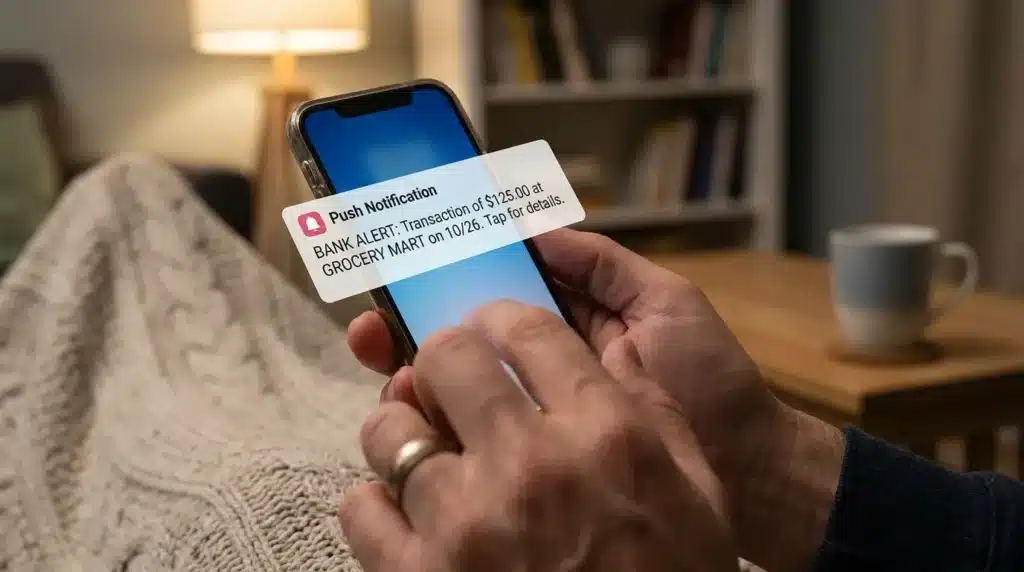
Activate Instant Push Notifications
Go into your banking app settings right now and turn on push notifications for every single transaction. Whether it is a $5 coffee or a $500 bill, your phone should buzz instantly. This turns your phone into a live guard dog that barks every time your money moves.
If a thief tries a small “test” charge of $1, you will see it immediately. This gives you the power to freeze your card before they try to take thousands. It is the most effective way to stop a crime while it is happening.
Set Daily Spending Limits
Another pro-level secret is to set a daily transaction limit. If you usually spend $200 a day, set your limit to $300. If a hacker tries to wire $5,000 out of your account, the bank will automatically block it.
You can always raise the limit temporarily if you need to buy something big. It adds an extra wall that a digital thief simply cannot climb over. It is a simple setting that acts like a safety belt for your savings.
Step 7: Protecting the Master Key (Securing Your Email)
Many people forget that their bank account is tied to their email address. If a hacker gets into your email, they can just click “Forgot Password” on your bank site. They will get a reset link in your inbox and change everything in seconds.
Email Security is Bank Security
Your email needs to be even more secure than your bank account. Use a completely unique password for your email that you use nowhere else. If you use the same password for a shopping site and that site gets hacked, your email—and your bank—are now at risk.
You must turn on app-based 2FA on your email account as well. Treat your email like the master key to your entire life. If the master key is safe, your other “doors” are much harder to open.
Check Your “Forwarding” Settings
Hackers often set up a “forwarding rule” once they get into an email. This means every email you get is also sent to their private address. Even if you change your password later, they can still see your private bank alerts.
Once a month, check your email settings to make sure no strange addresses are listed for forwarding. This is a “hidden” trick that many people miss. Keeping your email clean is the secret to long-term digital safety.
Step 8: Managing Your Digital Footprint via Guest Checkout
Every time you click “Save Card for Later” on a shopping website, you are leaving your financial DNA in a place you don’t control. If that shop has a data leak, your card details are sold on the dark web.
The “Guest Checkout” Strategy
Whenever possible, use guest checkout. It takes an extra minute to type in your details, but it means your sensitive info isn’t sitting on a random server for years. Think of it as “cleaning up after yourself” in the digital world.
Step 9: Masking Your Data with Virtual Card Numbers
Some banks and credit card apps allow you to create virtual card numbers. These are “fake” card details that link to your real account but can only be used once or for one specific store.
If a thief steals a virtual number from a breached retail database, it won’t work anywhere else. This is a pro-level secret for anyone who shops a lot online. It keeps your real bank details hidden behind a digital mask.
Step 10: Establishing a Monthly Digital Audit Routine
To keep your money safe for years, you need a professional routine. Digital safety is not a one-time setup; it is a lifestyle.
The Monthly Digital Audit
Set a reminder on your phone to do a ten-minute audit every month. Look through your transaction history for anything you don’t recognize. Check your “Linked Devices” in your bank app and remove any old phones or tablets you no longer use.
Stay Quiet on Social Media
Never post photos of your new credit card or talk about which bank you use on public forums. Thieves use social engineering to gather info about you.
They might see your “Mother’s Maiden Name” or the name of your first pet from a public quiz or post. These are common security questions used to reset passwords. Keeping your personal life private makes it much harder for someone to impersonate you to your bank. To fully restrict what data hackers can parse from your social timelines, configure your safety settings using our social media privacy settings guide.
Common Mistakes to Avoid (The Pitfalls)
- Clicking “Unsubscribe” in Spam: Clicking that link tells the thief that your email is active and that a real person is reading it. The best move is to mark the email as spam and delete it immediately.
- Using “Easy” Security Questions: If your answer can be found on your LinkedIn profile, it’s weak. Give a fake answer to security questions (e.g., Favorite food = “BlueBicycle77”), and save it in your password manager.
- Public Computers: Never use a computer at a library, hotel, or print shop to log into your bank. These computers can have keyloggers installed that record every single button you press.
- Storing Passwords in “Notes”: Keeping a list of passwords in an unlocked note on your phone is a “treasure map” for a thief. Use a dedicated password manager that requires a thumbprint or face-ID to open.
- Ignoring Small “Test” Charges: Thieves often start by taking a tiny amount, like $0.50 or $1.20, to see if you notice. Treat every single unrecognized cent as a major red flag.
Frequently Asked Questions About Banking Safety
Is it safe to use my bank’s mobile app?
Yes, in most cases, the official mobile app is safer than using a web browser. Apps often have built-in encryption and do not store your data in a way that other websites can see. Just make sure to only download the app from the official Google Play Store or Apple App Store.
Should I change my banking password every month?
While it sounds safe, changing it too often leads to using “easy” passwords that you can remember. Instead, create one very strong, long passphrase and only change it if you suspect a leak or a hack. A unique, 20-character password is much better than a short one changed frequently.
What should I do if I see a transaction I didn’t make?
Contact your bank’s fraud department immediately. Most banks allow you to “freeze” or “lock” your card through the app with one click. Do this first to prevent more money from being taken, then call the bank to report the issue.
Can hackers get into my account if they have my phone number?
If they use a trick called “SIM Swapping,” they can intercept your text message codes. This is why using an authenticator app is much safer than relying on SMS codes. Your phone number itself isn’t the key, but it can be used to bypass old security methods.
Is biometric login (Face ID or Fingerprint) safe for banking?
Biometric logins are generally very secure and much harder to fake than a written password. They also protect you from “keyloggers” that record what you type. Using your fingerprint combined with a strong password (two-factor) is the best way to stay protected.
Final Thoughts: Take Control of Your Money
You work too hard for your money to let a stranger take it in the middle of the night. Securing your online banking is about taking small, smart steps every day.
It might feel a little bit annoying to set up an authenticator app or type in your card details every time you shop. But that small bit of friction is exactly what keeps the thieves away. They are looking for the “easy” door, and you are making yours as hard as possible to open.
“The digital world moves fast, but a few simple habits can make your financial fortress completely un-hackable.”
Start Your Shield Today
You don’t have to do everything on this list in one hour. Start by changing your bank password to a long phrase today. Tomorrow, turn on your push notifications.
Each step you take makes you a harder target. You deserve to live your life without worrying about your balance disappearing. Take action now, and give yourself the gift of true financial peace.
Your money belongs to you. Keep it that way by being the smartest person in the digital room.
Financial & Cybersecurity Disclaimer: The material provided on Securely Life (securelylife.com) is for universal educational and informational purposes only. While we make every effort to deliver verified, industry-standard guidance on online banking defense, digital asset security, and data protection, we are not licensed financial planners, legal experts, or corporate security consultants. Digital fraud tactics evolve rapidly, and your specific local banking configuration may vary. Always consult your bank’s fraud protection policies and utilize professional judgment when addressing active financial threats. Securely Life assumes no legal responsibility for any actions taken, or losses incurred, based on the implementation of the concepts covered in this guide.