Imagine sitting in your living room, feeling completely safe. You have smart cameras to watch your kids and smart locks to keep intruders out.
But what if the very tools meant to protect you are actually inviting strangers into your private life? This is the scary reality for many people today.
We bring these gadgets into our bedrooms and kitchens without a second thought. We love the convenience of turning off lights with our voice.
However, most people do not realize that a hacker could be watching through that same camera.
The feeling of being violated in your own home is a nightmare no one should face. It is not just about data; it is about your personal safety and peace of mind.
Many homeowners feel overwhelmed by the technical side of things. They want to be safe but do not know where to start.
This confusion often leads to a false sense of security. You might think you are safe just because you have a password.
Sadly, hackers are getting smarter every single day while our defenses stay the same.
Why Most People Fail to Secure Their Devices
- Default Settings: Most devices come with simple passwords like “admin” or “1234.” Many users never change these because the manual is too long to read.
- Information Overload: If you search for help, you find thousands of complex articles. Most people give up because they do not understand the tech jargon.
- Manufacturer Neglect: Some companies care more about selling products than fixing security holes. They stop sending updates, leaving your device open to attacks.
- The “It Won’t Happen to Me” Mindset: We often think hackers only target big companies. In reality, they love targeting home networks because they are easy targets.
- Hidden Connections: You might learn how to stop spam emails from clogging your inbox forever to secure your data, but forget about your smart fridge or light bulb. Every single connected device is a potential doorway for a thief.
How Digital Insecurity Destroys Your Inner Peace
- Constant Anxiety: You start wondering if that clicking sound from the camera is a glitch or a hacker moving the lens.
- Loss of Trust: Technology should make life easier, but instead, it makes you feel paranoid. You stop enjoying your smart home features.
- Privacy Fear: The thought of your private conversations being recorded and sold is terrifying. It makes you feel exposed and powerless.
- Fear for Children: Knowing that a stranger could potentially talk to your child through a smart toy or monitor is a parent’s worst nightmare.
- Identity Theft Stress: A hacked home network can lead to stolen bank details. The financial stress can ruin your entire month or year.
The Reality of the Connected World
We live in a world where everything is connected to the internet. Your toaster, your watch, and even your front door lock are all online. This is great for comfort, but it creates a massive web of risks.
Hackers do not always look for your bank account right away. Sometimes, they just want to use your smart bulb to get into your laptop.
“Think of your home network like a castle. If you have a strong front gate but leave the back window open, the castle is not safe.”
Most people focus on their phones and computers. They forget that a cheap smart plug can be the weak link. Hackers look for the easiest way in, and usually, that is a device you haven’t thought about in months.
The truth is, many smart devices are built as cheaply as possible. Security is often an afterthought for the people who make them. This means the responsibility falls on you.
You have to be the one to lock the digital doors. It sounds hard, but it is actually quite simple once you know the right steps.
You do not need to be a computer genius to protect your family. You just need a clear plan.
Without a plan, you are just waiting for something bad to happen. With the right knowledge, you can enjoy all your gadgets without the fear of being watched.
It is time to take back control of your home and your privacy.
Building Your Digital Fortress: A Practical Guide
Now that we understand the risks, let’s talk about solutions. You can start securing your home right now. You don’t need to buy expensive software. Most of these steps just require a bit of your time and some smart choices.
Step 1: Secure Your Network Gatekeeper (The Router)
Your internet router is the most important piece of tech in your house. Every bit of data goes through it. If a hacker controls your router, they control everything.
Think of your router as the front door to your digital life. If the door is weak, everything inside is at risk.
The first thing you must do is change the admin password. Every router comes with a default password. You can usually find these online in seconds.
If you haven’t changed yours, a hacker can log in and see every device you own. Make it a long password with letters, numbers, and symbols.
Next, you should change the Network Name (SSID). Don’t name it “The Smith Family Home” or “Linksys678.” This tells hackers who you are or what hardware you use. Give it a generic name that doesn’t point to your house.
You should also look for a setting called WPA3 or WPA2 encryption. This is like a secret code that scrambles your data.
If you want to dive deeper into router security architecture, check out the ultimate guide to protecting your home Wi-Fi network to seal all network loopholes. A secure router is the foundation of a safe home.
Step 2: Use the Power of the “Guest Network”
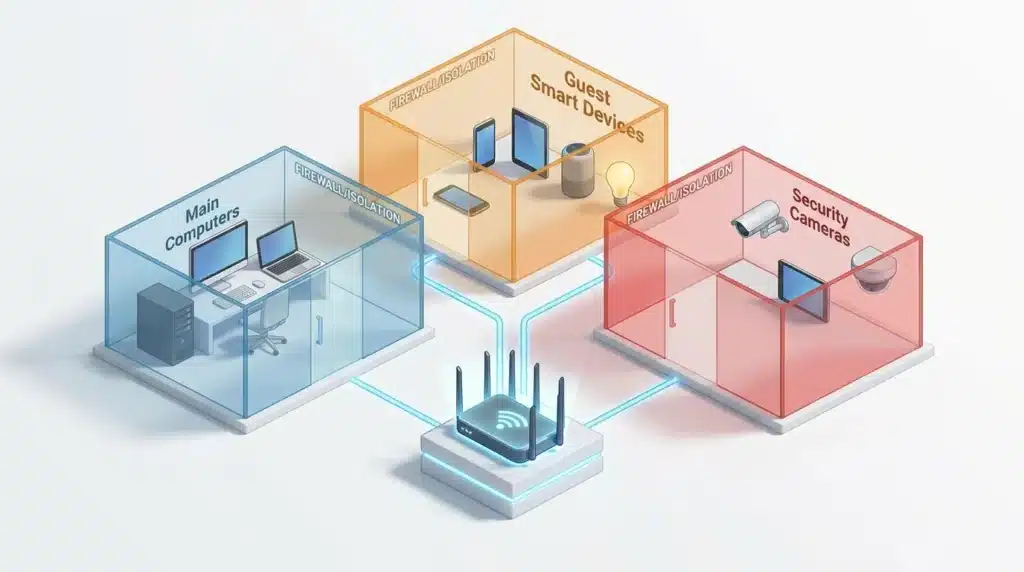
Most modern routers allow you to create a second Wi-Fi network. This is often called a Guest Network. This is one of the best tricks for smart home safety.
You should put all your smart bulbs, plugs, and cameras on this guest network. Keep your main laptop and phone on your private network.
Why do this? If a hacker manages to break into a cheap smart light bulb on the guest network, they are trapped there. They cannot jump over to your main network to steal your bank passwords from your laptop.
It acts like a firewall inside your house. It separates your “vulnerable” devices from your “important” devices. This simple step can stop a small problem from becoming a total disaster. It takes five minutes to set up but provides massive protection.
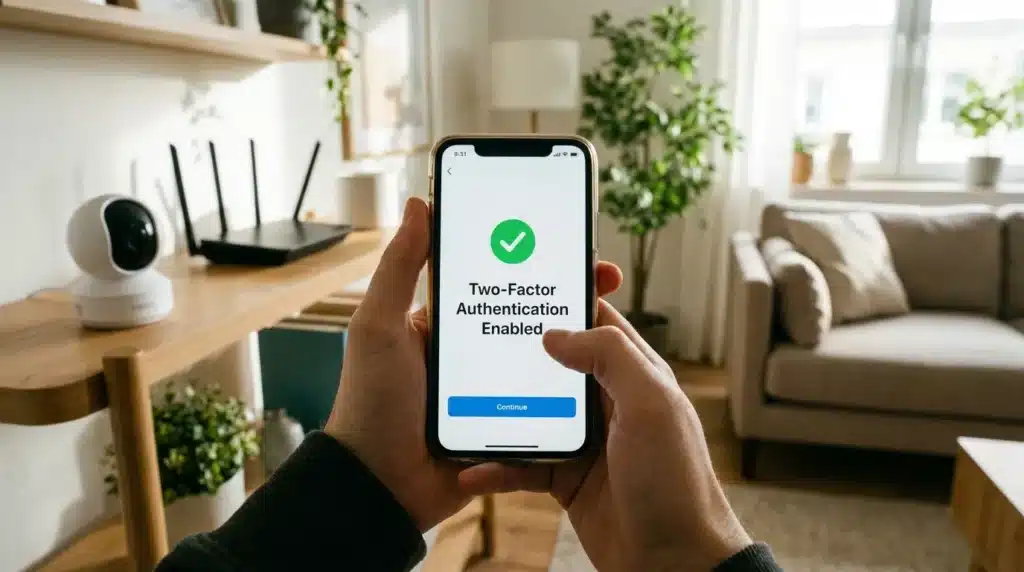
Step 3: Enable Two-Factor Authentication (2FA) Everywhere
You have probably heard of Two-Factor Authentication (2FA). It is that extra step where a website sends a code to your phone.
It might feel like a tiny bit of extra work, but it is insanely effective. Even if a hacker steals your password, they still cannot get in without that code.
Check the apps for your smart cameras and locks. See if they offer 2FA. If they do, turn it on immediately.
This is the “double lock” for your digital world. It is like having a key for your front door and a fingerprint scanner to go with it.
Most people avoid 2FA because they think it’s annoying. However, getting hacked is much more annoying. Many apps now use “push notifications,” so you just have to tap “Allow” on your phone.
It is a small price to pay for total peace of mind. If a device or app doesn’t offer 2FA, you should consider replacing it with one that does. Your security should never be a compromise.
Step 4: Keep Your Software Fresh and Updated
Hackers are always looking for “bugs” or holes in software. When a company finds a hole, they send out an update to patch it.
If you don’t update your device, that hole stays open. It’s like having a broken window in your house and refusing to fix it even though you have the glass.
Many smart devices do not update themselves automatically. You have to open the app and check for “Firmware Updates.” Make this a habit. Set a reminder on your phone to check your devices once a month.
An outdated device is a hacker’s playground. They use known vulnerabilities to take control of thousands of devices at once. By keeping your software fresh, you stay one step ahead of the bad guys. It is the easiest way to maintain a strong defense.
Step 5: Shutting the Hidden Backdoors (UPnP Settings)
Now that we have the basics covered, it is time to look at some advanced, pro-level settings. These next few steps are what security experts use to stay completely invisible online.
Have you ever wondered how your smart printer or game console connects so easily? They often use a feature called Universal Plug and Play (UPnP). While it sounds helpful, it is actually a major security risk. UPnP allows devices to open “ports” in your router’s firewall automatically. Hackers look for these open ports like a thief looks for an unlocked window.
To fix this, log into your router settings and turn off UPnP entirely. Yes, you might have to configure some intense online gaming devices via Static IP or DMZ allocation manually.
However, it is a small trade-off for keeping hackers out. This simple click can block thousands of automated attacks every single day.
Step 6: Using a Secure Digital Phonebook (Encrypted DNS)
Every time you type a website name, your computer uses a DNS server to turn names into numbers. Most people use the default phonebook provided by their internet company, which is often slow and not very private.
Hackers can sometimes “poison” these phonebooks to send you to fake websites. You can protect yourself by switching to a secure DNS provider.
Companies like Cloudflare (1.1.1.1) or Quad9 offer free services that block malicious websites before they even load. You can usually change the DNS settings directly in your router to protect every single device in your house at once.
Step 7: The Power of Hardwiring Your Tech
We all love Wi-Fi because it is convenient. But Wi-Fi signals can be intercepted from outside your house. If a device has an Ethernet port, you should use a cable to plug it in. This is called “hardwiring.”
A physical cable is much harder to hack than a wireless signal. It also makes your connection faster and more stable. If your smart TV or security camera is near your router, use a cable.
This reduces the amount of wireless “chatter” in the air and leaves a wired device with one less target for someone sitting in a car outside your home.
Using Real-Life Logic to Stay Safe
Think about your home’s security like a layer of onions. One layer is your router password. The next layer is your guest network. The next is 2FA. Every layer makes it harder for a hacker to reach the center.
A hacker is like a thief walking down a street at night. They look for the house with the lights off and the door unlocked. If they see your home has layers of security, they will move on to an easier target. You don’t need to be invisible; you just need to be too much trouble to hack.
“Physical security and digital security go hand in hand. You cannot have one without the other. Treat your gadgets with the same care you treat your house keys.”
By following these steps, you are not just protecting your data. You are protecting your family’s routine, your private conversations, and your sense of safety. You can finally enjoy the “smart” part of your home without the “scary” part.
Digital safety is a journey, not a destination. Keep learning and stay curious. The more you know, the safer you become. Your home should be your sanctuary, and with these steps, you can keep it that way.
Staying Safe for the Long Run
Securing your home is not a “one and done” task. It is a habit you need to build. One great tip is to audit your apps every few months. If you no longer use a specific smart plug, delete the account and the app.
Also, keep an eye on your email for security alerts. If a company tells you they had a data breach, do not ignore it. Change your password immediately. Being proactive is the difference between a minor annoyance and a total identity theft nightmare.
Avoiding the Traps: Common Mistakes Homeowners Make
- Buying “No-Name” Cheap Gadgets: We all love a good bargain. However, these “no-name” brands often have zero security updates. Always stick to well-known companies with a history of fixing security issues. Furthermore, if you suspect your personal accounts are compromised due to a cheap device leak, review the guide on how to secure your online banking from digital thieves immediately.
- Sharing Too Much on Social Media: Hackers use social media to gather information about you. If you post a photo of your new smart fridge, they know exactly what brand you use. If you post that you are going on vacation, you are telling the world your house is empty. Be very careful about what you share online.
- Ignoring the Logs and Alerts: Most smart home apps have a “Logs” or “Activity” section. Checking your logs once a week is a great habit. If you see a login from a city you’ve never visited, you know someone has your password. Catching a hack early can save your privacy.
- Leaving “Remote Management” On: This feature lets you change router settings from anywhere in the world, meaning your router’s login page is visible to everyone on the internet. Unless you absolutely need this, turn it off. Keep your control panel local.
- Forgetting to Reset Before Selling: Many people sell old smart devices or give them away without a factory reset. Your old device might still have your Wi-Fi password saved inside. Always perform a full factory reset before letting a gadget leave your house.
Frequently Asked Questions
How can I tell if my smart camera has been hacked?
Look for strange behavior. If the camera lens moves on its own or you hear odd noises, it might be compromised. Also, check the login history in the app. If you see unrecognized locations, change your password immediately.
Is one brand safer than another?
Generally, larger companies like Apple, Google, or Amazon spend more on security. They have teams that find and fix bugs. However, no device is 100% safe. The key is how you set it up and whether you use features like Two-Factor Authentication.
Do I really need a guest network for my smart bulbs?
Yes, it is highly recommended. Smart bulbs are simple and often have weak security. If a hacker breaks into a bulb on your main network, they can see your laptop. On a guest network, they are completely isolated.
Can a hacker unlock my front door if I have a smart lock?
It is possible but very rare if you follow safety rules. Most hackers look for easy digital paths. If you use a strong password and keep your software updated, it is often harder to hack a smart lock than to physically break a window.
Should I turn off my Wi-Fi when I go on vacation?
If you don’t have security cameras or smart sensors that need to stay online, turning off the Wi-Fi is a great idea. It removes the digital path into your home.
Taking Control of Your Digital Sanctuary
Security might feel like a lot of work, but it is about protecting what matters most. Your home should be the one place where you feel completely private. By following these steps, you are building a wall around your family.
Start small. Change one password today. Set up that guest network tomorrow. These small actions add up to a massive shield. You deserve to enjoy the convenience of modern tech without the constant worry of being watched.
Technology is a tool, and you are the master of that tool. When you take the time to secure your devices, you are taking back your power. Sleep better knowing that your digital doors are locked and your family is safe. You have the knowledge; now it is time to put it into action.